Letting a Bot Merge Its Own PRs (Without Turning Off Code Review)
October 27, 2026 • 7 min read
I had a repo that needed to accept contributions two different ways. Humans open PRs like normal and a code owner reviews them. A separate UI also creates PRs on behalf of users, CI checks run against them, and a bot approves and merges them automatically. The goal was to keep both paths solid and secure, and not weaken one to make the other work.
The catch is the branch rule that requires a code owner review. That’s exactly what you want for humans, but it leaves the UI’s PRs sitting around waiting on approvals that are really just rubber stamps, since CI already says whether the change is valid. Turning the rule off would fix the bot and break the human path.
Here’s what worked, and the one big gotcha to watch out for.
The Solution
Make the bot a GitHub App and add it to the bypass list of a branch ruleset. Then use two rulesets on the default branch:
- PR review - requires one approval and a code owner review. The bot is on the bypass list (in “pull requests only” mode).
- Required checks - requires the validation check and has an empty bypass list.
A human PR needs an approval from a code owner. The bot skips that, but both hit the second ruleset, so a failing, pending or missing check blocks the merge with a 405.
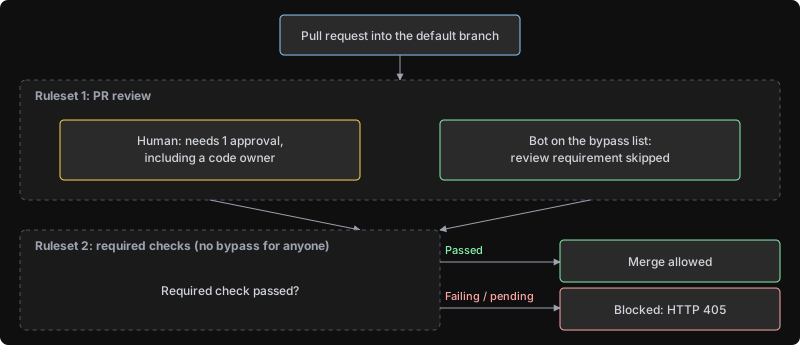
I looked at a few other options first:
- Machine user as a co-code-owner - a service account that approves the bot’s PRs. It needs a license seat, credential rotation and SSO, and an account that approves everything is a rubber stamp that looks like a human review.
- Keep humans reviewing - the problem I started with.
- Remove the path from CODEOWNERS - you lose review for humans too.
The GitHub App has no extra account to manage and uses short-lived installation tokens, so that’s what I went with.
Setup
Install the app with Contents (read & write), Pull requests (read & write), Checks (read) and Metadata (read). Leave Workflows off. More on that below.
The ruleset needs the app’s numeric ID (not the installation ID):
gh api apps/<your-app-slug> -q .id
Ruleset 1 is the “PR review” ruleset. Replace 123456 with your app ID:
{
  "name": "PR review",
  "target": "branch",
  "enforcement": "active",
  "conditions": { "ref_name": { "include": ["~DEFAULT_BRANCH"], "exclude": [] } },
  "bypass_actors": [
    { "actor_id": 123456, "actor_type": "Integration", "bypass_mode": "pull_request" }
  ],
  "rules": [
    { "type": "pull_request",
      "parameters": {
        "required_approving_review_count": 1,
        "require_code_owner_review": true,
        "dismiss_stale_reviews_on_push": true,
        "require_last_push_approval": true,
        "required_review_thread_resolution": false
      } }
  ]
}
"bypass_mode": "pull_request" means the app can only skip review through a PR. A direct push from the bot is blocked with a 409.
Ruleset 2 is “Required checks”. Note the empty bypass list and the check pinned to GitHub Actions (integration_id 15368). Without the pin, anything that can post a status could claim to be your check.
{
  "name": "Required checks",
  "target": "branch",
  "enforcement": "active",
  "conditions": { "ref_name": { "include": ["~DEFAULT_BRANCH"], "exclude": [] } },
  "bypass_actors": [],
  "rules": [
    { "type": "required_status_checks",
      "parameters": {
        "strict_required_status_checks_policy": false,
        "required_status_checks": [ { "context": "validate", "integration_id": 15368 } ]
      } }
  ]
}
Create both with gh api -X POST repos/your-org/your-repo/rulesets --input ruleset1.json. Run the check workflow at least once so its name shows up in GitHub.
The Bot’s Merge Script
Mint an installation token for the app (the actions/create-github-app-token action does this if you’re running in GitHub Actions), then use Node and Octokit to do the rest:
import { Octokit } from "octokit";

const [owner, repo] = "your-org/your-repo".split("/");
const ALLOWED = "submissions/"; // the directory the UI's PRs are allowed to touch
const DENIED = [".github/", "CODEOWNERS"];

const pull_number = Number(process.argv[2]); // the PR number the bot opened
const headSha = process.argv[3]; // the commit the bot pushed, NOT re-read from the PR

// authenticates as the app, not whoever is logged in
const octokit = new Octokit({ auth: process.env.INSTALLATION_TOKEN });

// 1. every changed file must live under the allowed directory (renames included)
const files = await octokit.paginate(octokit.rest.pulls.listFiles, { owner, repo, pull_number });
const outside = files.filter(({ filename, previous_filename = ALLOWED }) =>
  DENIED.some((prefix) => filename.startsWith(prefix)) ||
  !filename.startsWith(ALLOWED) ||
  !previous_filename.startsWith(ALLOWED));

if (outside.length) {
  console.log("Out-of-scope files, leaving for a human:", outside.map((f) => f.filename));
  process.exit(0);
}

// 2. wait for the required check on that commit (15368 = GitHub Actions)
let check;
for (let i = 0; i < 60 && check?.status !== "completed"; i++) {
  const { data } = await octokit.rest.checks.listForRef({ owner, repo, ref: headSha });
  check = data.check_runs.find((c) => c.name === "validate" && c.app?.id === 15368);
  if (check?.status !== "completed") await new Promise((r) => setTimeout(r, 10000));
}
if (check?.conclusion !== "success") {
  console.log(`Check not green (${check?.status}/${check?.conclusion}), leaving for a human`);
  process.exit(0);
}

// 3. merge, pinned to the sha we validated
try {
  await octokit.rest.pulls.merge({ owner, repo, pull_number, sha: headSha, merge_method: "squash" });
  console.log("merged");
} catch (err) {
  console.log(`merge rejected (${err.status}): ${err.message}, leaving the PR open for a human`);
}
A few things in there are doing real work:
- Pin the merge to the sha you validated. If a human pushes a commit after the bot did, the API returns a
409instead of merging the unreviewed change. If the bot re-reads the head right before merging, that protection is gone. - Check every file, including renames. The file list API reports
previous_filename. It also caps out around 3,000 files, so treat anything near that as “leave it for a human”. - Don’t retry a rejection. A failing, pending and missing check all come back as a
405, and the message tells you which one it is.
What I Tested
I built a throwaway repo on the same GitHub plan as my real one with a test app, two human accounts and a check I could make pass or fail.
- Bot merges an allowed PR with zero approvals
- Bot merges with a failing or pending check -
405until the check passes - Human pushes after the bot, bot merges with the old sha -
409 - Remove the bot from the bypass list - blocked, so the bypass is what grants the merge
- Human PRs still need a real code owner approval, and repo admins aren’t exempt
Then I repeated it on a second repo set up like my real one (existing branch protection, CI and CODEOWNERS) and ran into a couple of surprises:
- Classic branch protection beats your bypass. Classic rules and rulesets stack and the stricter one wins, so you can’t layer rulesets on top. Create the rulesets, verify the effective rules (
gh api repos/<owner>/<repo>/rules/branches/main), and only then delete classic protection. - The check name was different. My first test used
validate, but the actual gate was an aggregate CI job with a different name. Copy my JSON and every PR waits forever on a check that never runs, so grab the name from a real PR’s check runs.
The Big Gotcha
The bypass is branch-wide, not path-scoped. There’s no “only for this directory” setting. In one test the bot merged a PR that removed the owner line from CODEOWNERS. No review, HTTP 200. GitHub considers that perfectly valid. The only thing keeping the bot inside its directory is the allowlist in the bot’s own code.
So the guardrails matter more than the rules:
- Write a deny list (
CODEOWNERS,.github/**) as well as an allow list - Never give the app the
workflowspermission. When I tried to have the bot edit a workflow file, GitHub refused with a403only because the app lacked that permission - Scope the installation token to a single repo
- Protect the private key. Anyone with it can skip review on every repo where the app is on a bypass list
A few other things to know:
- Auto-merge doesn’t honor the bypass. I enabled it on a bot PR and it sat for four minutes waiting on a code owner who never came. Use the direct merge call.
- Bypassed merges leave no marker in the PR’s timeline events. The API just says “merged” by the bot. The evidence is in Rule insights and the org audit log (
protected_branch.policy_override), so alert on that and onrepository_ruleset.update. - Concurrent PRs can conflict. If PRs all touch a shared file, one merging can leave another conflicted. The bot can’t update a branch, so it gets a
405and leaves the PR for a human.