Multiple AWS Accounts Force Better Application Code
May 11, 2026 • 5 min read
While at AWS re:Invent this year, I was in a Chalk-talk called “Apply Amazon’s DevOps culture to your team”. The talk was primarily focused on how AWS is/was able to innovate quickly. Some of the quick highlight bullet points were:
- Have teams run like a lot of small startups
- Team owns the dependency choices such as infra or external
- Automate everything – no manually actions like sshing into a box
- Decompose for agility – aka two pizza teams
- Standardize on tools like CI/CD, version control, ticketing
- Multiple AWS accounts or at least a prod and non-prod
All great points, but the last one is what I want to dig into in this article - multiple AWS accounts from a developer’s perspective.
It’s Already a Best Practice
AWS already publishes in their documentation details on why having multiple accounts is considered best practice.
Using multiple AWS accounts to help isolate and manage your business applications and data can help you optimize across most of the AWS Well-Architected Framework pillars including operational excellence, security, reliability, and cost optimization.
That’s all true, but it’s focused on infrastructure concerns (isolation, compliance, cost allocation). What I find more interesting is how multi-account changes the way you write code. It turns out the constraint of deploying across accounts forces you into patterns that make your application better.
1. Forces applications to use dynamic configuration
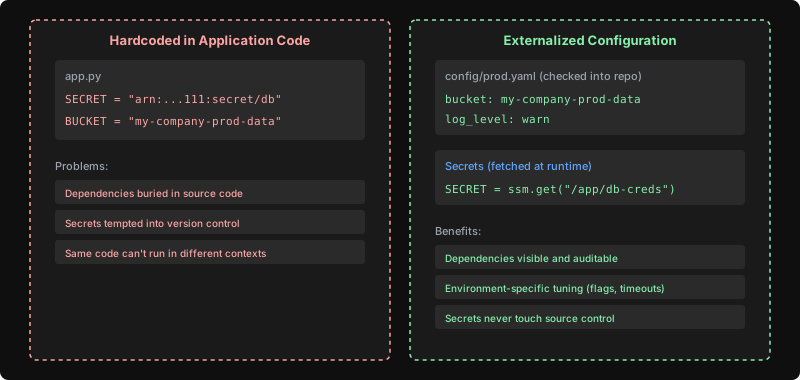
With a single AWS account, it’s easy to hardcode resource references directly in your application. Need a secret from Secrets Manager? Just paste the ARN. Need an S3 bucket? Hardcode the name. The same applies to DynamoDB table names, SQS queue URLs, and SNS topic ARNs - there is simply nothing forcing you to externalize configuration.
With multiple AWS accounts, a developer is forced on day 1 to define configuration outside of the application. The answer is almost always environment variables or SSM Parameter Store lookups that get injected at deploy time.
# Hardcoded (single account makes this too easy)
SECRET_ARN = "arn:aws:secretsmanager:us-east-1:111111111111:secret:db-creds"
BUCKET = "my-company-prod-data"

# Externalized (multi-account forces this pattern)
SECRET_ARN = os.environ["SECRET_ARN"]
BUCKET = os.environ["DATA_BUCKET"]
Why is externalized configuration valuable?
- Configuration becomes visible and auditable. When config lives in environment variables or SSM Parameter Store, you can see at a glance what an application depends on. Hardcoded values are buried in source code where they’re invisible to anyone not reading the implementation.
- Enables environment-specific tuning. Throttle rates, feature flags, log levels, timeout values – all can vary per environment without maintaining separate code branches.
- Secrets stay out of source control. When configuration is externalized by default, there’s no temptation to commit a “temporary” hardcoded secret that never gets cleaned up.
This doesn’t mean all configuration needs to come from environment variables or a parameter store. A simple config file per environment checked into your repo (e.g., config/dev.yaml, config/prod.yaml) is perfectly sufficient for non-sensitive values like resource names, feature flags, or timeout settings. The key distinction is that secrets must always be imported at runtime from something like Secrets Manager or SSM SecureString.
2. Forces deployments to be automated
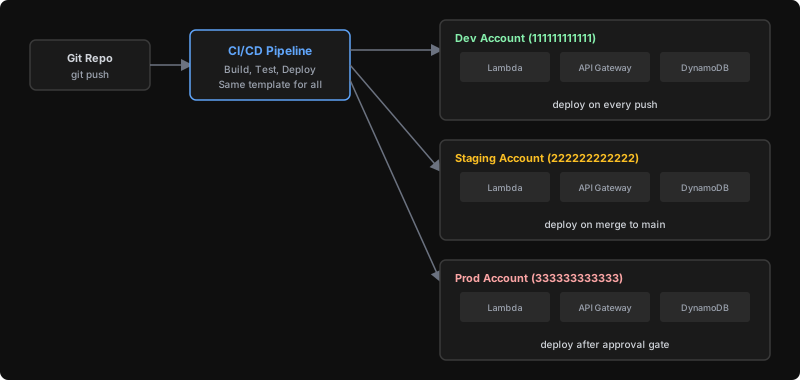
Maybe “forces” is too strong of a word, but developers are lazy. If you tell us we need consistent deployments across 3-4 environments in different AWS accounts (each with different credentials, different IAM roles to assume, and different parameter values) there’s no way we’re crafting that by hand each time.
In a single account, you can get away with deploying via the console or one-off CLI commands. But when the same application needs to exist identically in dev (account 111), staging (account 222), and prod (account 333), automation becomes the only sane option.
From a developer’s perspective, this changes how you work for the better:
- Your deployment becomes a repeatable artifact. No more “it worked when I deployed it” — the same process runs everywhere, so if it passes in staging it passes in prod.
- You can safely test deployment changes. Need to add a new resource or change a config? Deploy to dev first with confidence that you’re exercising the exact same path prod will take.
- Rollbacks become trivial. When your deployment is automated and consistent, rolling back is just re-running a previous version — not trying to remember what manual steps you took.
3. Encourages better security policies
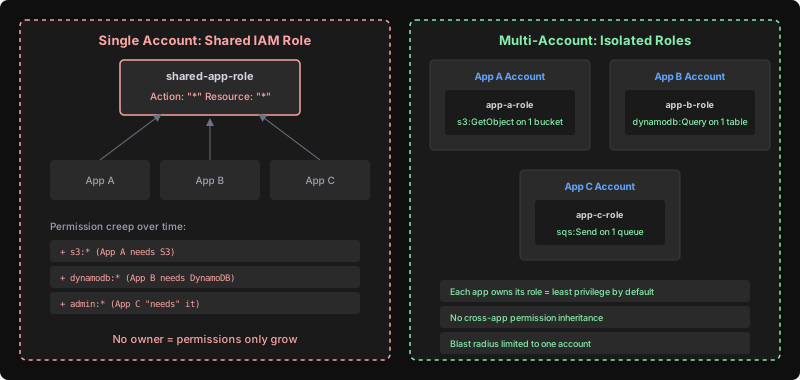
When sharing a single AWS account, it is very easy to reuse security policies like IAM roles or security groups across applications. Because they’re shared, there is no single owner which causes permissions to only ever increase over time.
I have firsthand experience with this. I’ve seen shared IAM roles accumulate permissions until they had full AdministratorAccess because one team “needed” broader permissions for their use case. Once a shared role exists, no one wants to remove permissions for fear of breaking another team’s application.
With separate accounts, each application is forced to define its own permissions. As a developer, this means you actually think about what your code needs access to:
# Your app's role - scoped to exactly what your code uses
- Effect: Allow
  Action: s3:GetObject
  Resource: arn:aws:s3:::app-a-data/*

# Not a shared role with everything bolted on
- Effect: Allow
  Action: "*"
  Resource: "*"
This has a direct impact on how you write application code. When your role only has s3:GetObject, you’ll get a clear permission error the moment your code tries to do something unexpected — like accidentally calling s3:PutObject or accessing the wrong bucket. Those errors surface immediately in dev, not as a security incident in prod. You’re essentially getting guardrails that tell you when your code is doing something it shouldn’t be.